How To Use GNS3 Emulator, What is GNS3

Basically network buddy knows Cisco packet tracer but this one has some limitation, so we can use GNS3 for networking best practice.


 Lets Know about some more detail about GNS3.

GNS3 is a Graphical Network Simulator that allows emulation of complex networks. You may be familiar with VMWare or Virtual PC that are used to emulate various operating systems in a virtual environment. These programs allow you to run operating systems such as Windows XP Professional or Ubuntu Linux in a virtual environment on your computer.
GNS3 allows the same type of emulation using Cisco Internetwork Operating Systems. It allows you to run a Cisco IOS in a virtual environment on your computer. GNS3 is a graphical front end to a product called Dynagen. Dynamips is the core program that allows IOS emulation. Dynagen runs on top of Dynamips to create a more user friendly, text-based environment. A user may create network topologies using simple Windows ini-type files with Dynagen running on top of Dynamips. GNS3 takes this a step further by providing a graphical environment.


Link:
Download GNS3 All Versions.

Passive and Active attacks


What is Passive attacks

It is common knowledge that when using an untrusted network, such as Internet CafĂ©, your communication with the gateway (i.e. a router or access point) must always be treated as untrustworthy.  
The methods available for intercepting users' traffic using a Man-in-the-Middle attack in order to initiate a Passive attack have already been widely discussed.  
For instance, an attacker sets-up an access point with the same network name and MAC address as a genuine one. This gives the attacker complete control over the communication of everyone who mistakenly uses the rogue network instead of the genuine one. This attack is described in the book "Wireless Hacking: Breaking Through "ii. 
Although Passive attacks work well and constitute a serious risk when using a public network, users can protect themselves by following a few general security guidelines, such as:
1. Use SSL as much as possible:
• Avoid logging in to any non-SSL sites
• Make sure the site's SSL certificate is valid
2. If you must access a non-SSL site:
• Do not supply sensitive information: Credit Cards, usernames and passwords.
• Be aware that the integrity of the information you see on such a Web site might have been compromised
• Do not execute applications downloaded from the site
• Do not install software updates, ActiveX controls, browser extensions, etc.
Of course, some of the attack vectors are still valid even if these security guidelines are followed, but the attacker cannot cause much harm, since the user never surfs to any site that deals with sensitive information. 

What is Active attacks
In the Active attack scenario, a malevolent third party manipulates a response within a legitimate session in a way that tricks the client into issuing an unwanted request (unknown to the user) that discloses sensitive information. The attacker can then apply a regular Passive attack on this information. It is important to emphasize that this is made possible by a design flaw, not an implementation error or bug. 
We describe this type of attack as "active" rather than "passive" because of two essential differences in the nature of the attack:
• It is initiated by the attacker rather than the victim 
• The target is entirely controlled by the attacker, rather than being limited by the extent of the victim's browsing activity

IP Addressing / Difference between Static IP and DHCP IP


IP (Internet Protocol address) is a unique identification number (E.g Telephone number) to the network devices (Printer, Laptop, server) and it assigned on network card, where user can pass there packets in network.


Static IP: -
In general we are use static word for where the thing not changed log time. Same in networking when a device is assigned a static IP address, it does not change. The device always has the same IP address.  

Dynamic IP (DHCP IP): -
Dynamic IP is an IP address which one given to device for lease purpose in general example rented house. DHCP IP address are basically used in big organization where static IP not possible to give in all system or device. ISP is one of best example for DHCP addressing it gives IP address for some restricted time like 24 hours, 1 day or 1 month and after that remove automatically and gives new one.


How to configure Static IP address on devices.

For configuring static IP on LAN card we need to open network and sharing center.

Press the Windows key + R and type the ncpa.cpl in run box.

Select the network device icon and go to the property.

Use Two WhatsApp Accounts in a single Android phone.


Yes it’s possible to use two accounts in single mobile phone and it can be do WhatsMApp. It is a modded verison of WhatsApp.  Overcoming all the cones in the WhatsApp messenger, WhatsMApp apk was released.  It is literally ruling the roost these days with its amazing features.  With people becoming tech savvy day by day and with technological enhancements reaching the sky WhatsmApp is ruling the world of messaging with its ultimate features ever.  WhatsMApp can be used to send messages, receive messages, calls, share photos, videos, voice messages etc.The best feature of WhatsMApp is that it allows you to maintain two WhatsApp accounts from the same device.Also there are many issues and complaints about the WhatsmApp apk version and here are the resolved and enhanced features of WhatsApp, which we now call as WhatsMApp.apk

WhatsMApp.apk Features
Last seen hide
Blue tick hide
Double tick hide
Hide typing
Change icon
Action Bar color changing
Navigation bar color changing
Status Bar color changing
Change Notification icon color
Change chat balloon colors and text colors
Fastest Mod of WhatsApp
Anti Ban code
Copy messages without date and name
Copy content status & phone number
Image and video quality and sharing limit mods
Image and video preview mods
Group status.
How to install WhatsApp APK
 how to install WhatsMapp with the help of APK.
 Installing WhatsMapp is very simple. By following the below steps you can install the WhatsMApp to operate dual whatsapp accounts from a single android device.
 Install Stock Whatsapp from Playstore
  1. Verify your mobile number and chat with at last one person.

  2. Make sure you keep a copy of that chat by creating the backup for that particular chat through WhatsApp settings.

  3. Uninstall Stock Whatsapp.

  4. And now install WhatsMApp apk file.

  5. Verify number and the backup chats.


How to change MAC address on Android Device?

First of all I want to tell why we need to change MAC address on device.
There are some security reasons we need to change device MAC address.
Here is one example if you want to connect unknown Wi-Fi then some smart guy bind there MAC address in there router. Then that case we need to change our device MAC address. But my kindly requests don’t try for any wrong purpose.
So let’s start how to do that.
For changing MAC we need one browser called root file browser this browser you will get on google play store


If any issue please comment.

How to troubleshoot internet connection problems?


Whenever Internet got disconnect me be frustrate and  mashing F5 desperately to reload your favorite website when you experience a problem, here are some ways you can troubleshoot the problem and identify the cause.
  1. Ping (Packet internet gopher)
  2. Ipconfig(Windows) or ifconfig(Linux, Unix and MAC OS)
  3. Tracert (Trace route)
  4. Nslookup (query Internet name servers interactively)
  5.  127.0.0.1 (Loop back Address)


Before use this commands first check  modem and LAN switch status lights if both are device working fine then cross check cable issue.


Next to open command prompt and check your IP
Win key + R -> RUN -> CMD -> ifconfig or ipconfig


If connection has IP address then ping the default getaway. And make sure its get replay from getaway IP otherwise once cross check your router configuration.
There is next command for checking internet packet path is tracert :-

Problems with a Specific Website
Nslookup is a MX and TXT record finder and website troubleshooting command to check you DNS Server Problems.

Difference between broadband and leased line?


There is first difference between Broadband and Leased Line is Prices.

An Internet Leased Line is usually a dedicated line which offers direct connectivity to the Internet e.g. (Atlantic Broadband, Vodafone, Airtel, TATA or your Local ISP provider ) its gives there connection through optical fiber cable, radio links or any combination of direct line from there POP/Nodal point to your end.

In Broadband Internet they give you net from there nearest CP (Center point device) which one placed for multiple user and its not dedicated line or single user its sharing network means device.

In detail about Leased Line connection / Benefit of Leased Line.
  
While there are business broadband options available at pretty good price points, Internet Leased Lines are still preferred with a lot of customers for the following reasons:
Internet Leased Lines offer same speed for both uploads and downloads (symmetric connectivity), while in broadband (through DSL technology) the speeds are always optimized for downloads and the upload speeds are much lesser. Symmetric connectivity is critical for applications like file sharing between two branches, hosting websites/ mail servers etc, video conferencing/ surveillance, voice over IP etc. all of which are used by medium and large businesses regularly.
Generally, broadband connectivity is shared with multiple users in a locality. Broadband plans generally denote the best bandwidth that can be attained and not the assured bandwidth levels. But a 2 Mbps Internet Leased Line should give 2 Mbps of performance as it is a dedicated connection without any sharing.
The backbone network and performance parameters (like latency, jitter etc) can be monitored in the case of Internet Leased Lines. So, it is easier to offer SLA (Service Level Agreements) to the customer and Internet Leased Lines generally come with an SLA. There are very few broadband plans that offer such performance guarantee. So, Internet Leased Lines are more reliable.
There is a wider choice of bandwidth selection (64 Kbps, 128 Kbps,… 2 Mbps,… 155 Mbps etc) with Internet Leased Lines. With broadband, the selection is more restricted.
Higher bandwidth (Greater than 8 Mbps) is possible only through Internet Leased Lines. That’s why it is the default choice for large organizations with hundreds of internet users.
Internet Leased lines are provided through multiple media – Copper, Fiber, Radio links or a combination of the above. Optical media communication is more reliable and offers better fault tolerance/ performance/ monitoring abilities, especially for higher bandwidths.
Internet Leased Lines come with unlimited usage plans which enables companies to add services like video, voice etc over IP in addition to the internet/ data connectivity. Most of the broadband plans offer usage based billing (based on the bandwidth consumed). Of course, there are unlimited usage plans with broadband as well.
Internet Leased Lines offer a pool of permanent IP addresses which enables organizations to run their own mail servers, web servers and other applications.
Internet Leased Lines offer better QoS (Quality of Service) when compared to broadband. So, it is more effective to run convergent services like voice, video etc. over Internet Leased Lines.

Internet Leased Lines can be leveraged to form a Virtual Private Network across multiple branches more effectively than broadband connections.

How to access Whatsapp in web browser?

How do I use WhatsApp Web?

To provide you with a richer communication experience, WhatsApp is now accessible both on your phone and your computer. WhatsApp Web is a computer based extension of the WhatsApp account on your phone. The messages you send and receive are fully synced between your phone and your computer, and you can see all messages on both devices. Any action you take on the phone will apply to WhatsApp Web and vice versa. At this time, WhatsApp Web is available only for Android, iPhone 8.1+, Windows Phone 8.0 and 8.1, Nokia S60, Nokia S40 EVO, BlackBerry and BlackBerry 10 smartphones.
WhatsApp Web is not another WhatsApp account. When you use WhatsApp on your computer and your phone, you are simply accessing the same account on these two devices.

Minimum requirements to enjoy WhatsApp Web

You need to have an active WhatsApp account on your phone.
You need to have a stable internet connection on both your phone and your computer.
You need to use the latest version of Chrome, Firefox, Opera or Safari as your web browser on your computer.

To get started with WhatsApp Web

Visit https://web.whatsapp.com in a Google Chrome browser or any browser.
Update the WhatsApp app to the latest version in your phone.
Choose WhatsApp Web from the menu.
You will see a QR code — scan the code inside of WhatsApp, and you’re ready to go. You have now paired WhatsApp on your phone with the WhatsApp web client.
Your phone needs to stay connected to the internet for our web client to work.
This service is currently available to Android, Windows and Blackberry users.


Note: To avoid data usage charges on your phone, we recommend that you are always connected to Wi-Fi when using WhatsApp Web.

How to create Hotspot on Laptop or System / How to access Internet without Router

How to Use Your Laptop as a Wi-Fi Hotspot 


Yes it’s Possible to use your internet in your any device like ipad, MAC book, Android or any wireless device without Buy any new router. How it is? If your using any Laptop or wireless device machine so it is possible to use your wired Internet connection to turn on in to the Wi-fi router for that we need to use some command on CMD line or another method is using Software tool but after free version we need to buy there pro version.
Method First Command Line

1. Open the command prompt. Using win-kay + R. or search the cmd.
C:\>Netsh wlan show drivers

Output

Below command  verify your laptop supporting Hotspot or Not.

2.  Creating the hotspot network
  C:\>netsh vlan set hostednetwork mode=allow ssid=hotspotname key=password
Output

Note:- ssid you can type your name also and key for your password like your Mobile number or easy for remembering 

3) Start your hotspot
C:\>netsh wlan start hostednetwork
For stop

C:\>netsh wlan stop hostednetwork

4. Last Step is sharing wireless network.
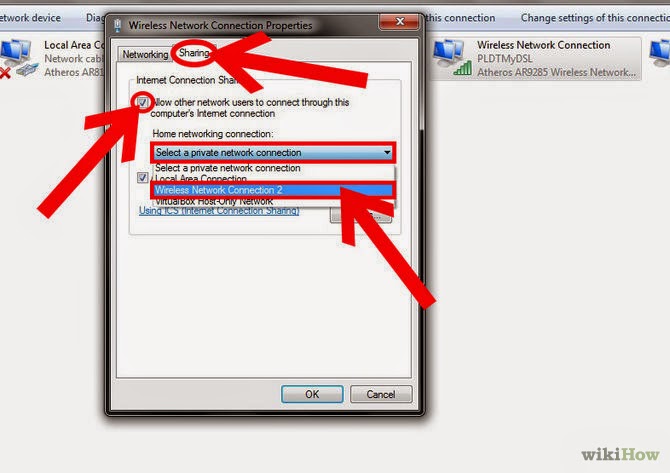
In Run type the "ncpa.cpl". Right click on wireless ico, go to the property after that click on sharing tab and share your wireless connection.


Lenovo k4 note with ANT VR Headset

Lenovo k4 note


OVerarching functions / About Lenovo K4 Note
Processor – Mediatek Octa Core 6753 Processor 64 Bit
RAM – 3 GB RAM.
NFC Support – Yes.
Display – 5.5 inch Full HD Display with 401 PPI.
Fingerprint Scanner mounted at back.
OS – Android Lollipop 5.1 OS with Vibe UI.
Rear Camera 13 Mega-pixel Auto-focus.
Front Camera – 5 Mega Pixel.
Connectivity – Dual Sim with 4G LTE support.
Dual Front Speakers
Battery Capacity – 3300 mAH
Weight – 158 grams
 Price Rs. 11,999

How to Crimp CAT-5 or CAT-6 cable / How to made Network cable

In a LAN or local networking below two types of LAN cable crimping are commonly use.
  1. Straight over Cable
  2. Cross over Cable


Straight over cable and crossed over cable are using commonly in below scenarios and it cost effective compare to other costly cables like fiber optic cables.


For crimping the CAT5 or CAT6 cable we need a below tools.


 Crimping Tool                                                            LAN Tester                                         RJ 45 Jack

Below cable Sequence we can use for Straight cable.


 If your connecting same Network devices you have to crimp the below format cable 
(Cross over).


How To Clear Your DNS Cache

HTML 404 error codes 

Below One of the reason website not opening.

Overview

Your DNS cache stores locations (IP addresses) of webservers that contain pages which you have recently viewed. If the location of the web server changes before the entry in your DNS cache updates, you will be unable to access the site. If you encounter a large number of HTML 404 error codes, you may need to clear your DNS cache. Once you clear your DNS cache, your computer will query nameservers for the new DNS information.

How to clear your DNS cache

The following methods allow you to remove old and inaccurate DNS information that may result in 404 errors.

Windows® XP, 2000, or Vista®

  1. Click the Start button.
  2. On the Start menu, click Run....
    • If you do not see the Run command in Vista, enter "run" in the Search bar.
  3. Type the following in the Run text box: ipconfig /flushdns

MacOS® 10.7

  1. Click Applications.
  2. Click Utilities.
  3. Double-click the Terminal application.
  4. Type the following: sudo killall -HUP mDNSResponder
    • Warning: To run this command, you will need to know the computer's Admin account password.

MacOS® 10.5 and 10.6

  1. Click Applications.
  2. Click Utilities.
  3. Double-click the Terminal application.
  4. Type the following: dscacheutil -flushcache

WinRar file view in jpeg Format

Copy jpeg file in to rar file in binary format


 First find an image with JPG format and a RAR file you need to hide in the image.In this tutorial I assumed your image file name “
TutoEX.jpg
” and the RAR file name is“
TutoEX.rar
”(File names can be any of you desire, you don’t need to rename your files to names I havementioned above)Now go to Windows command prompt (Start>Run>type cmd and press enter)In the command Prompt window type:

copy /b TutoEX.jpg + TutoEX.rar NEWTUTO.jpg

switch “/b” indicates the copy function is binary“
NEWTUTO.jpg
” is the result of image with the embedded TutoEX.RAR (you can choose anyname as you prefer for your New Secret JPG file)

USB Pen Drive Bootable

Free Utility To Make Your USB Pen Drive Bootable

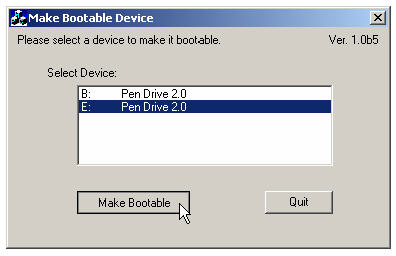
If you are an fairly advanced computer user, at times you may need to boot from devices other then the default hard-disk, mainly to troubleshoot virus infections and other critical operating-system related issues, I had shared tips on how to make bootable cd for performing advance system tasks on windows. Today I will share few utilities enabling you to create bootable USB pen drives with ease, you need to have Motherboard/BIOS with USB boot support for this to work. MakeBootable is an free and simple-to-use utility to make your Pen Drive act as a boot-up disk without erasing any data on the device. It consists of a single executable file and requires no installation, However the utility will only work on USB device's using Phison’s chip solution and FAT file-system only (you can re-format your drives to FAT easily).
Direct Download : Make_bootable.zip (465Kb)
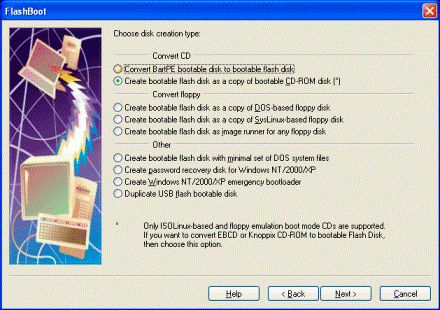
If the above utility fails to recognize your USB drive you can download and use the HP USB Format Utility and HP USB Boot utility, They work with other brands of flash drives as well, The best software for creating bootable flash drives with the most extensive support of drives and advance options would be "FlashBoot" from PrimeExpert but its not free and costs around $31, you can download and try the demo version.


Hard disk error check, Problems of slow Laptop and computer


Disk surface test, check disk bad sectors and hard drive error with ...

When a hard drive is manufactured, it usually contains some bad sectors. With the disk comes into increasing use, more can develop. The data stored in a bad sector can be corrupted or lost.

How to know if there are bad sectors in the hard drive? A surface test tool does what it implies - it scans the disk surface to check for bad sectors and mark bad sectors so that the computer knows not to use them in the future.


Below some tools to check the System or Laptop Bad-sectors or problems.

1) Eassos -  Web link

Screen Shot for Eassos